A year of real use
As an Amazon Associate I earn from qualifying purchases.
Running out of space is the quiet killer of any video workflow. Cards fill up, laptops choke, and suddenly you're deleting old projects you might need again.
We've used the WD Elements 20TB desktop drive for over a year. Short version: it's fast, it's been completely reliable, and 20TB means you stop thinking about space. We score it 9.6/10.
If you shoot video and need one big, simple place to keep it all, this is the drive we'd buy again.
Check the current price on Amazon: https://link.amazon/B053fXUDN
## WD Elements 20TB review: the quick verdict
Score: 9.6/10
Best for: video creators, photographers and anyone backing up a lot of footage at home or in the studio.
What we like:
- 20TB of space in one box
- Fast enough to copy big shoots without the wait dragging
- Rock solid after more than a year of daily use
- Plug it in and it works, no software needed
- Quiet on the desk
What could be better:
- It's a spinning hard drive, so it's slower than an SSD
- Needs mains power, so it stays on the desk
- Comes formatted for Windows, so Mac users need to reformat it first
## Key specs
| Spec | WD Elements Desktop 20TB |
|---|---|
| Capacity | 20TB |
| Type | 3.5-inch desktop hard drive (HDD) |
| Connection | USB 3.0, works with USB 2.0 |
| Power | Mains power adapter (not powered by USB) |
| Format out of the box | NTFS (Windows) |
| Size | 48 x 165.8 x 135 mm |
| Model | WDBWLG0200HBK-EESN |
## What it's like to live with
### Set-up takes about a minute
Plug in the power, plug in the USB cable, and it shows up as a drive. That's it. No apps, no accounts, no updates.
If you're on a Mac, reformat it first in Disk Utility. Pick exFAT if you want it to work on both Mac and Windows.
### Speed: fast for a hard drive
This is a spinning hard drive, not an SSD. That's the trade-off for this much space at this price.
In our day-to-day use it's been fast. Offloading a full day's footage is a case of starting the copy and getting on with something else. It's quick enough to back up and archive without it becoming a chore.
If you want to edit 4K straight off an external drive with no lag, an SSD is the better tool. For storing, backing up and archiving, this does the job brilliantly.
### Reliability: a year in, not a single problem
This is the bit that matters most, and it's why the score is so high.
We've used ours for over a year, with no errors, no dropouts and no lost files. When a drive holds years of your work, that's what you're paying for.
One honest note: no hard drive lasts forever. Keep a second copy of anything you can't replace, on another drive or in the cloud. That's good practice with any storage, not a flaw in this one.
### Noise and size
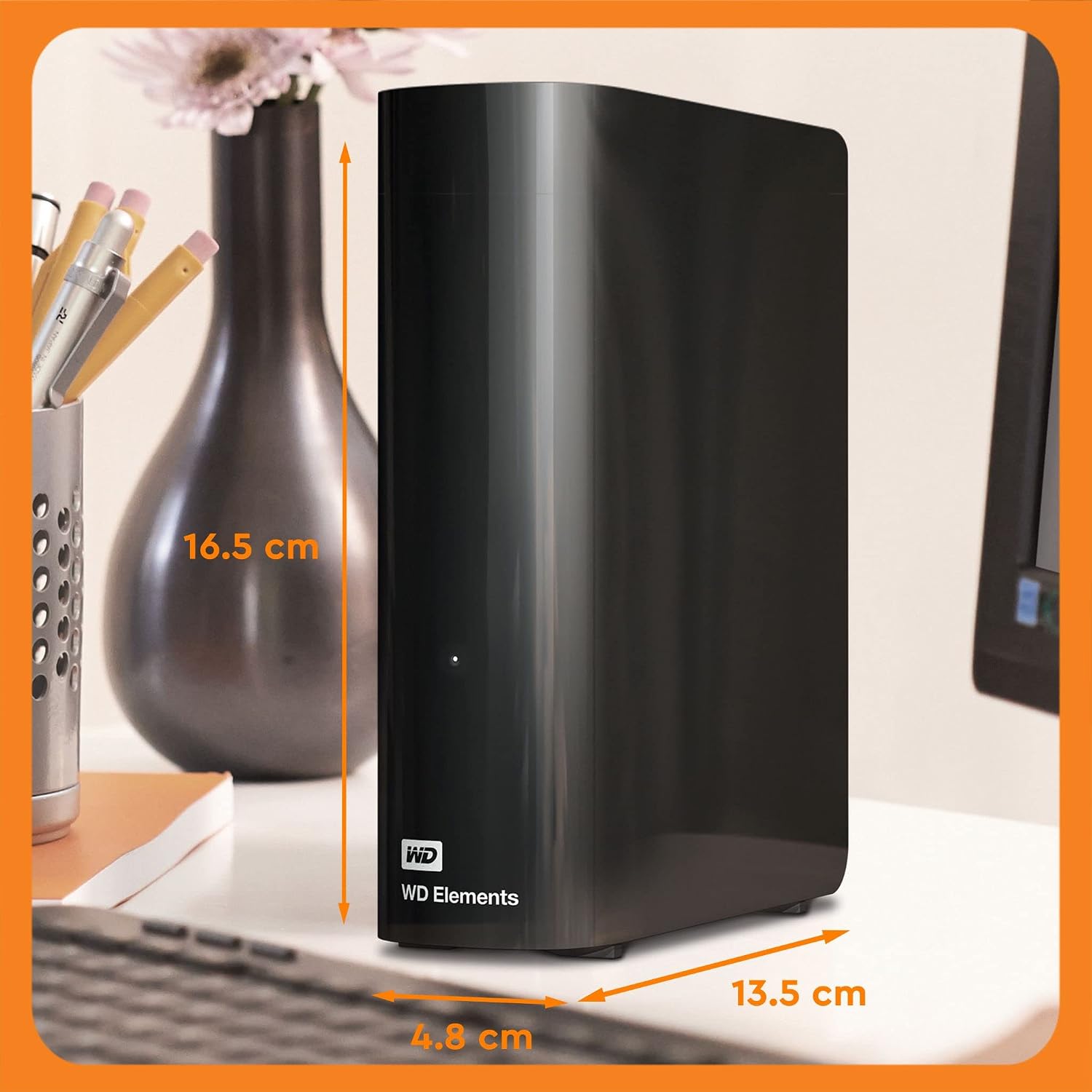 It sits quietly on the desk. You'll hear a soft hum when it's working hard, but it's not distracting during an edit.
It's a desktop drive, so it's bigger than a pocket SSD and needs a plug socket. Think of it as a base station, not something for your camera bag.
See the WD Elements 20TB on Amazon: https://link.amazon/B0d0ZjMWV
## How it compares
### WD Elements vs WD My Book
The My Book is WD's other desktop drive. It adds backup software and password protection with hardware encryption. If you want the drive locked or backups automated, look at the My Book.
If you just want plain, simple storage, the Elements gives you the space without the extras.
### WD Elements vs a portable SSD
A portable SSD is much faster and fits in your pocket, but 20TB of SSD storage would cost far more. Most creators use both: a small SSD for active projects, and a big drive like this for everything else.
## Who should buy it
- Video creators who fill cards fast and need somewhere to put it all
- Photographers backing up RAW files
- Anyone building a simple home or studio backup
- People who want lots of space without a complicated set-up
## Who should skip it
- If you need to edit heavy 4K or 8K straight off the drive, get an SSD
- If you need storage on the move, get a portable drive that runs off USB power
- If you need encryption or automatic backups built in, look at the WD My Book
## Questions people ask
It sits quietly on the desk. You'll hear a soft hum when it's working hard, but it's not distracting during an edit.
It's a desktop drive, so it's bigger than a pocket SSD and needs a plug socket. Think of it as a base station, not something for your camera bag.
See the WD Elements 20TB on Amazon: https://link.amazon/B0d0ZjMWV
## How it compares
### WD Elements vs WD My Book
The My Book is WD's other desktop drive. It adds backup software and password protection with hardware encryption. If you want the drive locked or backups automated, look at the My Book.
If you just want plain, simple storage, the Elements gives you the space without the extras.
### WD Elements vs a portable SSD
A portable SSD is much faster and fits in your pocket, but 20TB of SSD storage would cost far more. Most creators use both: a small SSD for active projects, and a big drive like this for everything else.
## Who should buy it
- Video creators who fill cards fast and need somewhere to put it all
- Photographers backing up RAW files
- Anyone building a simple home or studio backup
- People who want lots of space without a complicated set-up
## Who should skip it
- If you need to edit heavy 4K or 8K straight off the drive, get an SSD
- If you need storage on the move, get a portable drive that runs off USB power
- If you need encryption or automatic backups built in, look at the WD My Book
## Questions people ask
 ### Is the WD Elements 20TB reliable?
In our experience, yes. We've used ours for over a year with no faults at all. Still, keep a second backup of anything you can't replace, as you would with any drive.
### Does the WD Elements 20TB work with a Mac?
Yes, but it comes formatted for Windows (NTFS). Reformat it in Disk Utility before you use it. Choose exFAT if you also want it to work on a Windows PC.
### Is the WD Elements an SSD?
No, it's a traditional spinning hard drive. That's how it gets 20TB at a sensible price. It's slower than an SSD, but more than fast enough for backups and archives.
### Does it need a power supply?
Yes. It's a desktop drive and comes with a mains adapter. It can't run on USB power alone.
### Is 20TB too much?
Not if you shoot video. A few busy months of 4K can eat several terabytes. 20TB gives you years of room before you need to think about it again.
## The verdict: 9.6/10
After a year of real use, the WD Elements 20TB has earned its place on our desk. It's fast for a hard drive, simple to use, and it's never let us down.
It's not trying to be an SSD, and it doesn't need to be. For storing and backing up a growing pile of footage, it's the easiest recommendation we've made.
Buy the WD Elements 20TB on Amazon: https://link.amazon/B0d0ZjMWV
### Is the WD Elements 20TB reliable?
In our experience, yes. We've used ours for over a year with no faults at all. Still, keep a second backup of anything you can't replace, as you would with any drive.
### Does the WD Elements 20TB work with a Mac?
Yes, but it comes formatted for Windows (NTFS). Reformat it in Disk Utility before you use it. Choose exFAT if you also want it to work on a Windows PC.
### Is the WD Elements an SSD?
No, it's a traditional spinning hard drive. That's how it gets 20TB at a sensible price. It's slower than an SSD, but more than fast enough for backups and archives.
### Does it need a power supply?
Yes. It's a desktop drive and comes with a mains adapter. It can't run on USB power alone.
### Is 20TB too much?
Not if you shoot video. A few busy months of 4K can eat several terabytes. 20TB gives you years of room before you need to think about it again.
## The verdict: 9.6/10
After a year of real use, the WD Elements 20TB has earned its place on our desk. It's fast for a hard drive, simple to use, and it's never let us down.
It's not trying to be an SSD, and it doesn't need to be. For storing and backing up a growing pile of footage, it's the easiest recommendation we've made.
Buy the WD Elements 20TB on Amazon: https://link.amazon/B0d0ZjMWV